



29/06/26
HTTPDesync&XS-LeakviaRangeOracle
EnD | SekaiCTF 2026
Thanks for sharing!
بِسْمِ اللَّهِ الرَّحْمَنِ الرَّحِيمِ
I know your browser history
Hey hey! Back again with another wild web challenge. This one is from SekaiCTF 2026. Will talk about HTTP Desync + XS-Leak in technical details! Simply explained. Hope you enjoy!
Download challenge from here
Challenge Overview
We get a "ReadView" app, basically a reading proxy. You register a URL, the proxy fetches it for you, and serves it at
/view/<name>/. There's an admin bot with a session cookie, and on the backend there's a Flask API holding the flag.The Architecture
- The bot visits any URL we give it. It has an admin session cookie set on
localhost:3000. - The proxy proxies our registered pages and applies a strict CSP: no inline scripts,
script-src 'self'only. - The API holds the flag in
_INBOX. We can search it with a valid API key. The API key is shown on/admin. - The API is not publicly reachable. Host header check blocks anything that isn't
localhost,api, or127.0.0.1.
The attack path is:
- Get JS running on the proxy origin -> read
/admin-> grab the API key - Use the API key to extract the flag from the search endpoint
Let's go stage by stage.
Stage 1: Making the Proxy Execute Our JS
Let's go over some basics first.
How Does HTTP Keep-Alive Work?
When your browser loads a page, it doesn't open a new connection for every single file. That would be so slow. Instead, HTTP/1.1 keeps the connection open and reuses it for multiple requests. Request 1 goes in, response 1 comes back, then request 2 goes in on the same connection, and so on
But here's the question: how does the browser know where one response ends and the next begins?
Answer: the
Content-Length header. It tells the browser exactly the length the response body is. Once the browser reads that many bytes, it considers the response done and marks the connection as free for the next requestThe Bug in the Proxy
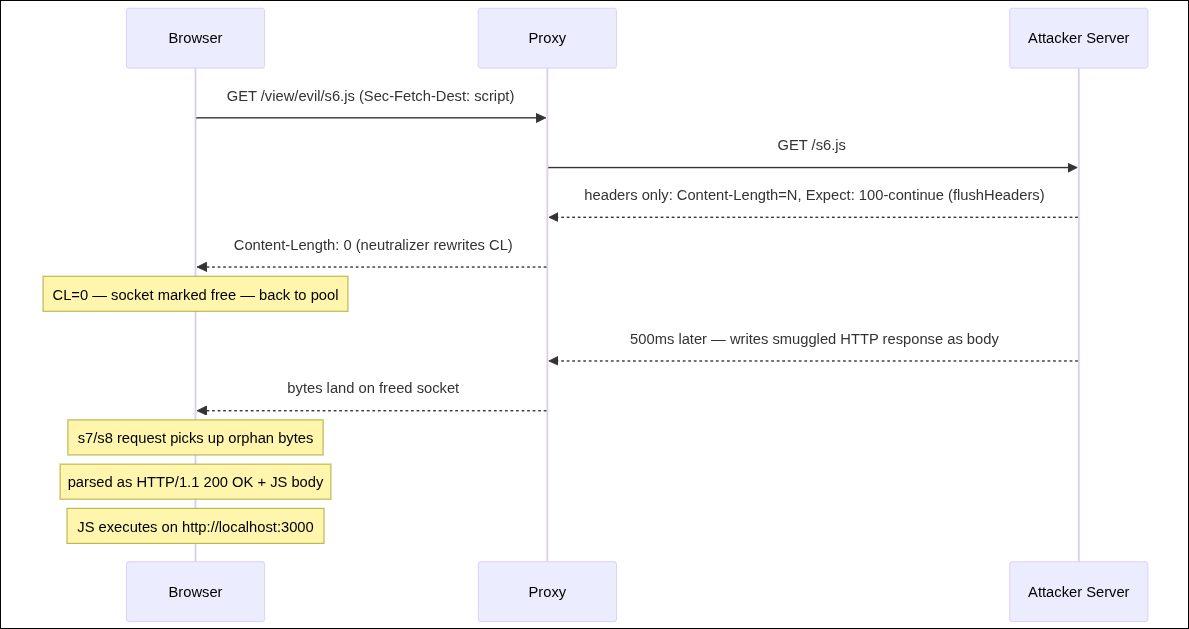
The proxy tries to block scripts. When a request has
Sec-Fetch-Dest: script (browser adds this automatically for <script> tags), the proxy does this:The proxy sends
Content-Length: 0 to the browser, but then it still sends the entire upstream body to the TCP socketWhat does the browser do? It reads
CL: 0, considers the response finished (zero bytes = done), and puts the socket back into the connection pool for reuse. The extra bytes keep arriving... but the browser already moved on. Those bytes sit orphaned in the TCP bufferWhen the next http request gets assigned to that same connection, the browser's HTTP parser reads those orphaned bytes and treats them as the start of a new response. If those bytes happen to look like a valid HTTP response (important. this is a must!) the browser acts on them
This is called an HTTP response desync. The browser's view of where responses begin and end is "out of sync" with what actually happened
Side note: Why doesn't Node.js stop this? Because Node.js doesn't enforce Content-Length on writes. You can declareCL: 0and still write as many bytes as you want. It just doesn't care:
Read more on Portswigger's HTTP Desync Attacks
Exploitation
Before we get into the steps, one thing needs mentioning: how do we make the orphaned bytes useful?
We mentioned that it will be in the start of the next response, but a response is not valid with just body bytes, it needs status line, headers .. etc
Those orphaned bytes need to look like a complete, valid HTTP response on their own: status line, headers, and a JS body. We craft that entire response ourselves and send it as the body of s6.
Now some chrome stuff
Chrome opens a maximum of 6 connections per host. If all 6 are occupied, any new request has to wait in line. When a socket frees up, the next waiting request gets assigned to it
Here is the plan:
We will load 8 scripts. We keep all 6 connections busy with slow-responding scripts, then trigger the desync on one of them. The queued scripts (s7/s8) just need a free socket, and the one they get happens to be poisoned with our orphaned bytes
To simply put it:
Step 1: Register our server on the proxy
Now
/view/evil/ proxies to our server.Step 2: Submit the trigger URL to the bot:
We don't submit
/view/evil/ directly. Instead, we submit a page on our own server that opens the proxy page in a popup:The bot lands on our trigger page, which opens a popup to the proxy. That popup is what runs our attack
Step 3: The pool saturation page
When the proxy fetches our upstream
/ page (to serve it at /view/evil/), we return 8 script tags:Chrome opens max 6 connections per host. All 8 script requests go through the proxy with
Sec-Fetch-Dest: script. Scripts s1-s5, s7-s8 deliberately stall for 2 seconds, keeping all 6 connections busy.Step 4: The desync payload (s6.js)
s6.js is our magic endpoint. Here's what it sends:SMUGGLED_RESPONSE is a complete, properly-formatted HTTP response:What
flushHeaders() + Expect: 100-continue does: It forces the headers to be sent to the browser immediately, without waiting for the body. The proxy sees our upstream headers, applies the CL:0 rewrite, and sends those headers to the browser right now. The browser marks the socket as free. Then 500ms later, our body bytes arrive, but the browser's "socket is done" flag is already set, so those bytes land as orphansStep 5: The collision
With all 6 connections tied up by the slow scripts, and the orphaned bytes sitting in the pool... one of the queued script requests (s7 or s8) gets assigned to that exact socket. Chrome's parser reads the orphaned bytes, parses them as a proper HTTP response, and since
Content-Type: application/javascript -> executes the code.and we simply just exfiltrate the api key
Stage 2: Leaking the Flag
The Oracle
The API's search endpoint does this:
conditional=True enables HTTP Range requestsHere's the key insight: the response body size changes depending on whether
q is a correct prefix:Query q | Match? | Body | Size |
|---|---|---|---|
SEKAI{ | yes | {"results":["SEKAI{...full flag...}"]} | ~43 bytes |
SEKAI{z | no | {"results":[]} | 15 bytes |
Now if we add a
Range: bytes=20- header to our request:- Hit (~43 bytes): bytes 20-42 exist -> 206 Partial Content
- Miss (~15 bytes): byte 20 doesn't exist -> 416 Range Not Satisfiable
Clean binary signal. But... we can't read the status of a cross-origin response. So how do we observe the 206 vs 416 difference?
The Side Channel
The bot runs puppeteer 22.12.0, which bundles Chrome 126 (126.0.6478.63). And we have this CVE-2026-1504 and its Chromium Issue 474435504
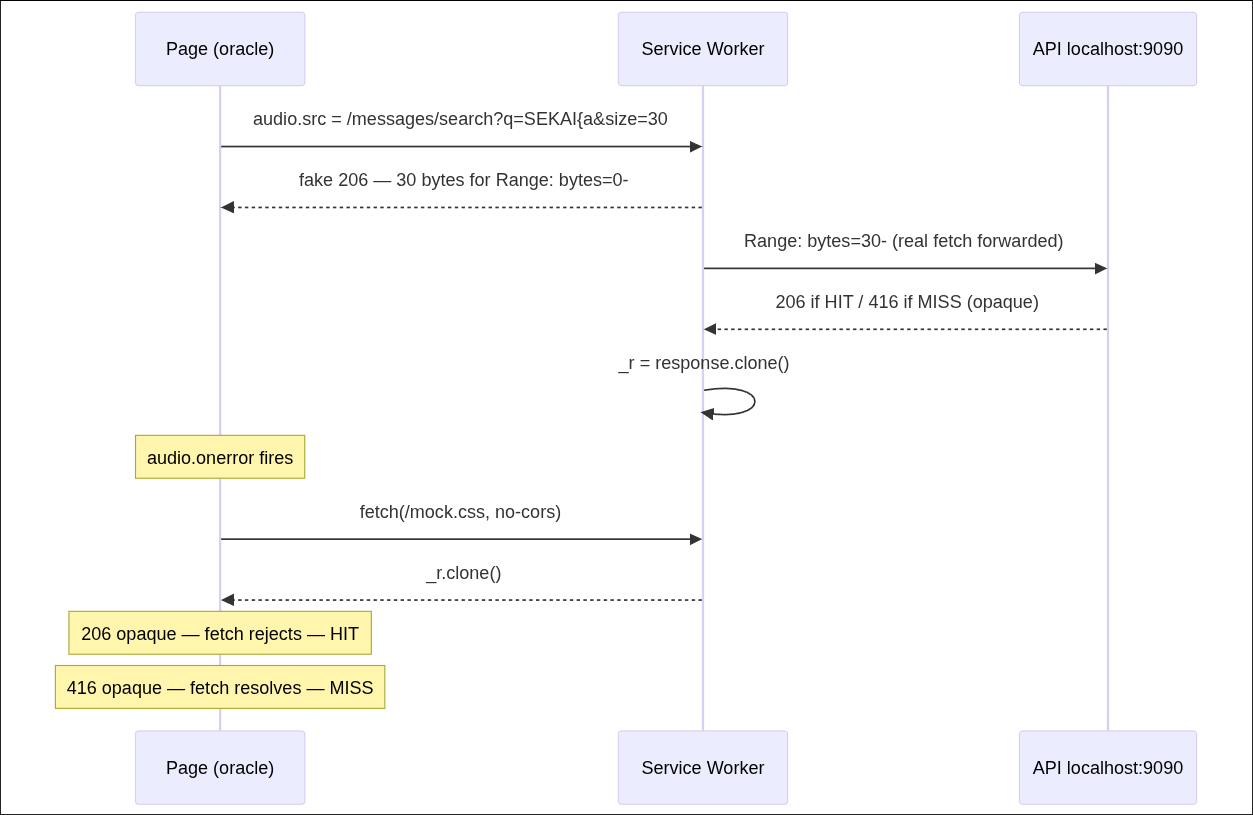
When a Service Worker replays a captured opaque206 Partial Contentresponse back to afetch()call, the fetch rejects. But an opaque416response lets the fetch resolve
Did you get it? We needed a way to differentiate between 206 and 416, and this is our way to it
Now let me walk you through the full mechanism
Step-by-Step: The Service Worker Oracle
Our oracle page (on our server, in the bot's popup) registers a Service Worker. SWs can intercept all fetches from their controlled page, including cross-origin ones to
localhost:9090.We load an
<audio> element pointing at the API search endpoint:Chrome's audio engine automatically issues two Range requests for audio content:
Range: bytes=0--> to get the beginningRange: bytes=30--> to get the rest (after seeing the first 30 bytes)
Our Service Worker intercepts both:
After
audio.onerror fires (it always errors because we gave it fake audio data):The full flow:
Extracting the Flag Character by Character
Now we have a yes/no oracle for any prefix guess. We loop through a charset and extend the known prefix one character at a time:
SEKAI{proxy_said_n0_w4y_l0ng_W4y_4nD_f1n4lllyyy_Y0u_are_H3r3_here_eda1ndj}
Edit: someone actually solved it with a timing side channel instead. The response body size differs by ~28 bytes between a hit and a miss, too small to measure reliably on its own. The trick was amplification: fire 160 parallel requests per guess and measure total completion time. 160 * 28 bytes = 4480 bytes of extra data on a hit, which creates a consistent, measurable gap even over loopback.
here is his comment in the server for credit: here (you must join the discord server to view this message)
This one took a lot of research and iteration. Big respect to the challenge author zonkor, check out his solver and writeup here
That was it, stay amazing. See you in the next one!
Tags: